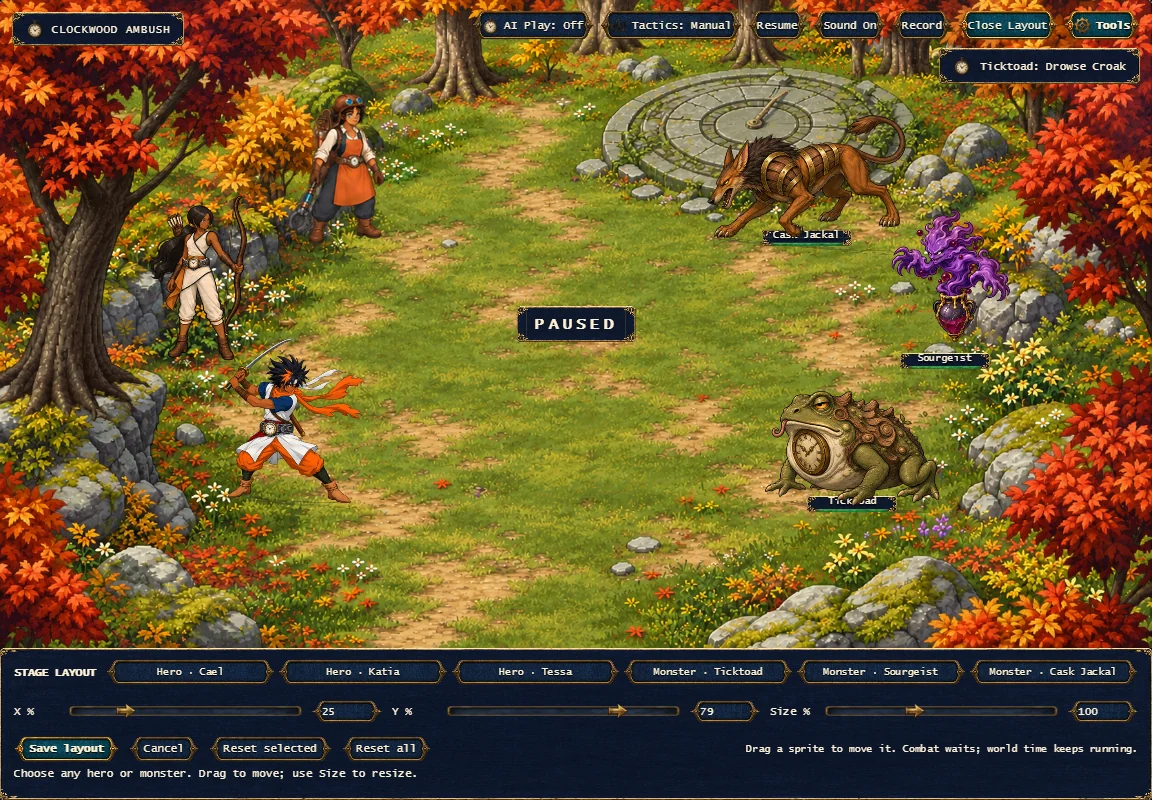
A battle scene is easier to judge when you can arrange it. The new Stage Layout editor in The Alcohol of Time lets you select a visible hero or monster, drag its sprite, and adjust horizontal position, vertical position, and size with sliders or numbers. It is a presentation tool for the current prototype, not a new combat system.
The important boundary is between visible placement and logical formation. The battle rules still use their original positions when resolving circles, lines, rays, and other target patterns. Changing where a sprite is drawn does not change its stats, decision pool, damage, or random-number behavior. That keeps a useful layout experiment from becoming an accidental rules change.
Move the actor, keep its motion
The editor leaves the current artwork and animation sources intact. It changes the sprite’s displayed width while retaining its authored canvas proportions. Movement reads the visible body when finding an approach or contact point; lighting and shadows also read the current displayed image. The intent is for an actor to remain itself when its presentation is resized.
Padding around a drawing matters too. An idle frame, a wide attack, and a held down pose can have different transparent space. Resizing should not suddenly lift a defeated creature off its floor line. The editor accounts for the existing placement offset rather than replacing the drawing with a standing image or canceling its animation.
A reversible workspace
Opening Stage Layout stops new combat dispatch while any in-progress attack or collapse finishes before editing becomes available. The world clock and weather continue. The controls sit over the existing menu area, leaving the battlefield visible, without enlarging or stretching the fixed game screen.
Save the layout you want. Cancel the experiment you don’t.
Save keeps cosmetic settings per hero or monster in that browser, including after a restart. Cancel restores the settings from before the editor opened. Reset selected restores one actor; Reset all clears the saved layouts, including entries not currently on the field. Saving a reset makes that choice persistent.
Keyboard and pointer use need the same care as the visual placement. Arrow nudges, numeric drafts, actor selection, and dragging should not overwrite one another. The editor’s interaction review caught cases where an old drag or an uncommitted number could affect the wrong selection; those paths were repaired before the final reviewed source.
This is one more tool for inspecting a work in progress. It makes comparison easier, but it does not turn unfinished animations into verified ones, and it does not mean the full game is complete. The animation milestone remains a separate record.